Cut the cost of building digital forms
With MoJ Forms you can:
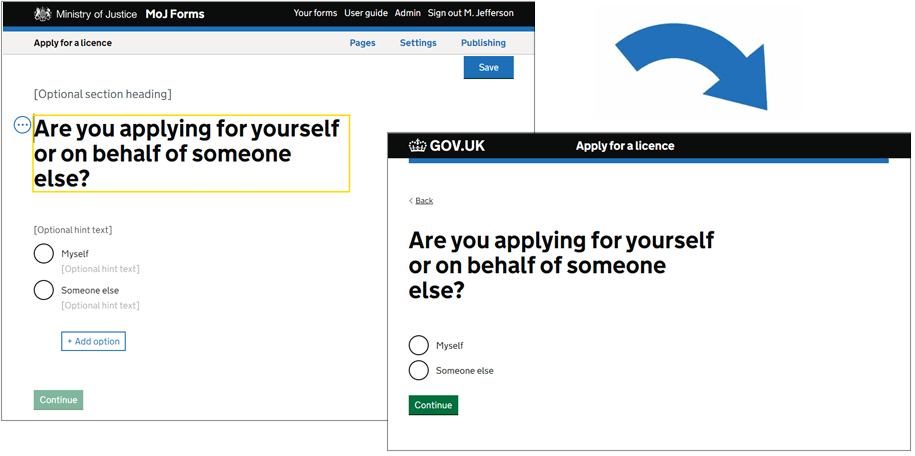
- prototype, create, test and publish forms
- build form pages using a variety of question formats
- design and guide your users through complex journeys with our visual flow and branching
- show different versions of content on a page based on a user's answers
- link users to GOV.UK Pay for an uninterrupted payment journey
- allow users to save a partially completed form and come back later
- collect user data in PDF and CSV format direct to your inbox
- link your form to a Google Analytics account to monitor performance
A service you can trust
MoJ Forms can save you months in design, development and testing time. All the page templates and components available to you have been:
- built to GOV.UK Design System styles and patterns
- tested with real users
- audited for accessibility
In addition, your forms will be hosted on a monitored, supported platform and your users’ data will be protected to the highest government standards.
How teams are using MoJ Forms
- Court of Protection is helping people apply to be a deputy for someone who may lack mental capacity
- Official Solicitor and Public Trustee (OSPT) is improving the process for landlords to register a notice when a tenant dies without an executor or will
- HM Prisons and Probation Service (HMPPS) is enabling people to block unwanted contact from prisoners
- MoJ recruitment team is connecting with people who are interested in working in prisons and probation
- Criminal Injuries Compensation Authority (CICA) is capturing enquiries and complaints from the public
When to use MoJ Forms
MoJ Forms should be considered alongside GOV.UK Forms – a separate form-building platform from the Government Digital Service (GDS).
GOV.UK Forms can be used for a wide variety of forms that:
- sit on GOV.UK
- need standard form components like text fields and radio buttons
- need 1 or 2 branches
GOV.UK Forms should be a team's choice for building simple and straightforward forms. MoJ Forms should generally be used for more complex forms and when GOV.UK Forms is unsuitable.
Find out more about choosing between GOV.UK Forms and MoJ Forms.